Architecture and Concepts of Infinite Scale
This page explains the architecture and core concepts of Infinite Scale, including spaces, the microservice runtime and the request flow. It is for administrators and operators who want to understand how oCIS components interact before deploying or scaling an instance. You should be familiar with microservices and basic networking.
11 min read · Level: intermediate · Last updated for oCIS 9.0.0-rc.1 on 25.10.2026
Introduction
This page gives you an overview of the architecture and the concepts behind Infinite Scale. Infinite Scale was designed from the beginning as a data platform providing tools to integrate, organize, share and govern data and metadata.
These topics have always been kept in mind during the development of Infinite Scale:
-
data platform
-
unified data access
-
cloud data ecosystems
-
support of the customers data strategy
Architecture Overview
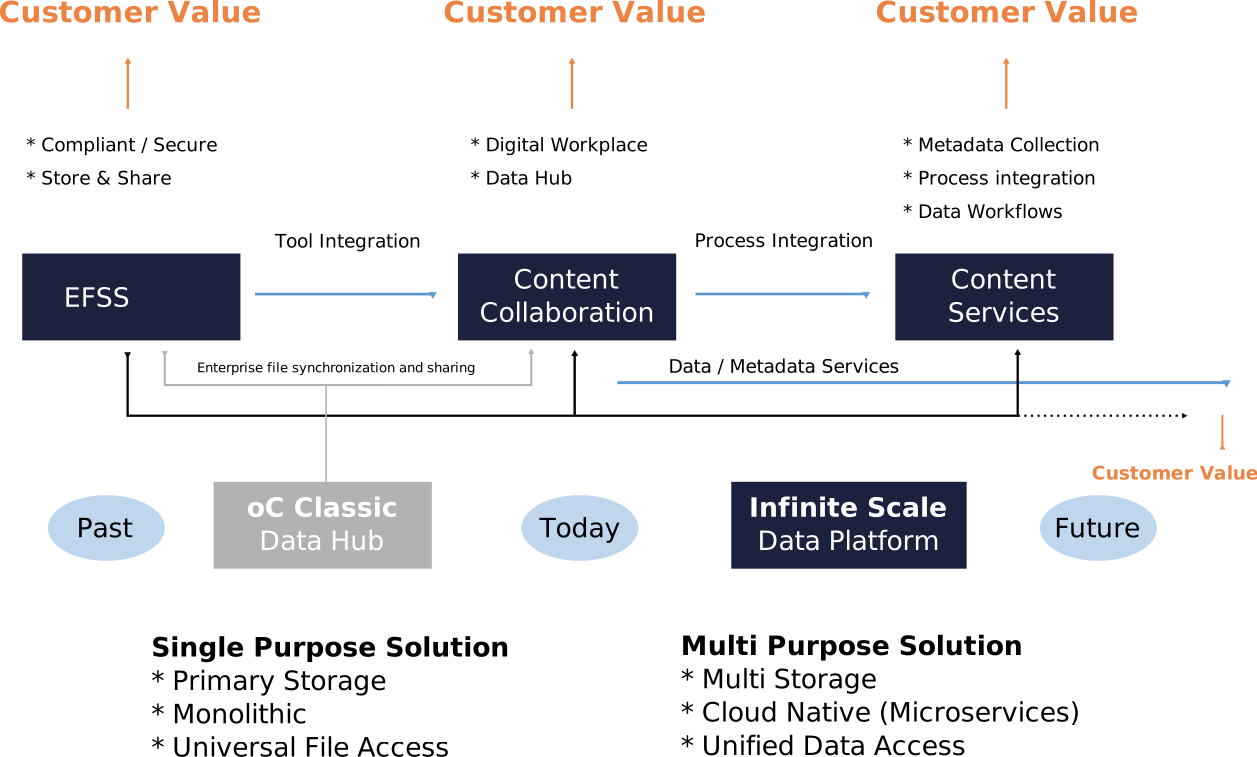
Looking at the image below, you see that the state of classic file sharing is not sufficient for today’s requirements and the trend clearly heads toward services around data and metadata. Iron-cast structures do not allow for additional value that could be created out of data and metadata. Services available to clients like end users or management have to be able to follow different and dynamic requirements. This is the basis of the Infinite Scale architecture.
C4 Model
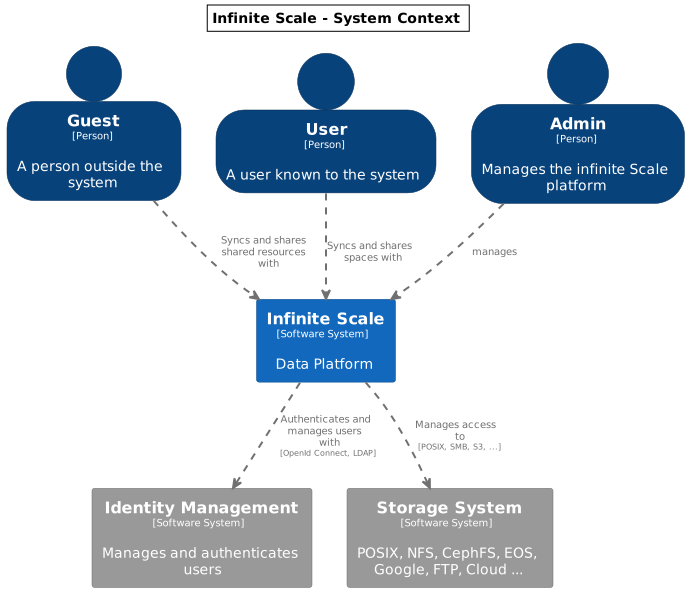
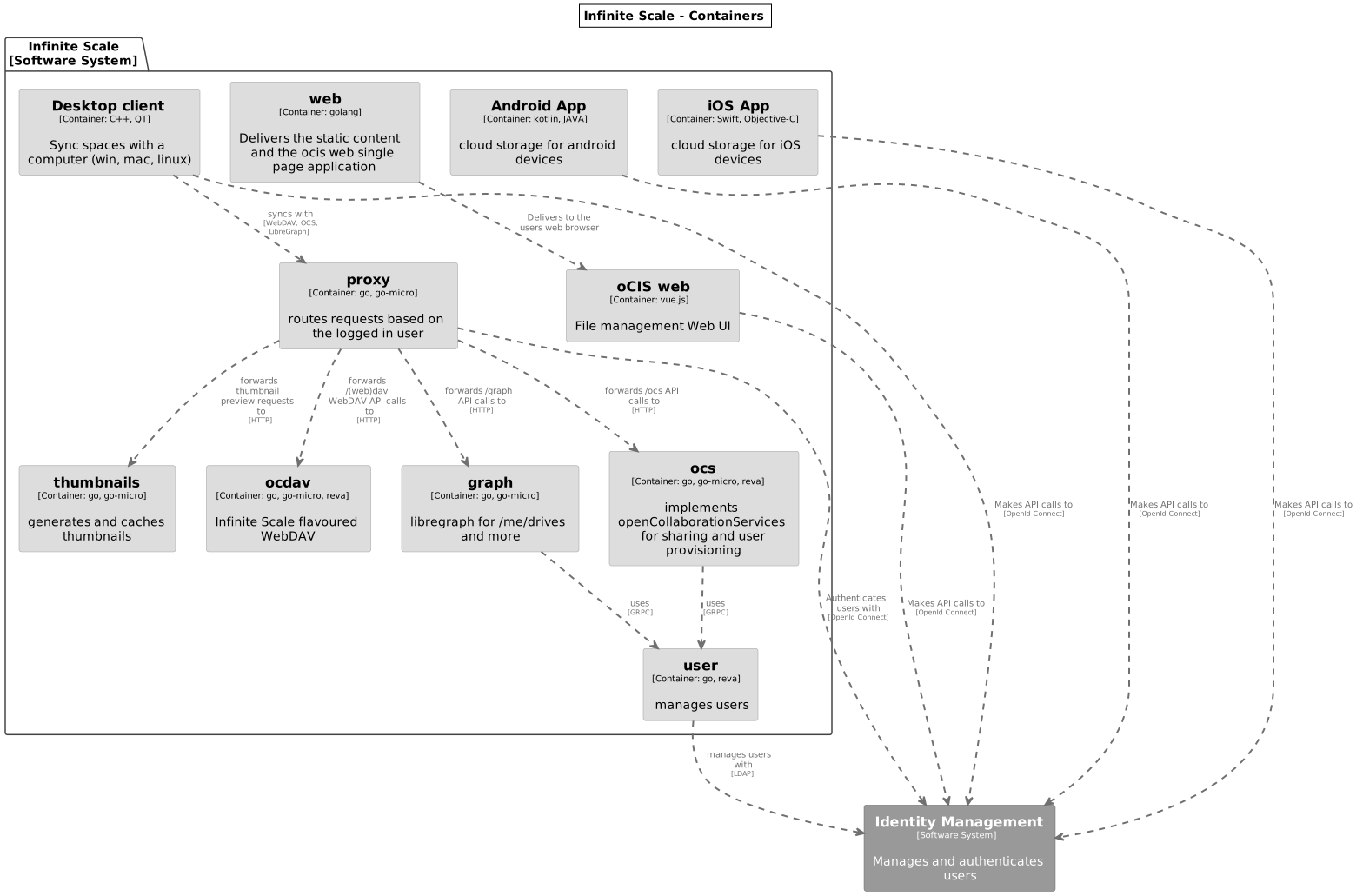
We use the C4 model to visualise the software architecture of Infinite Scale.
The C4 model is a lean graphical notation technique for modelling the architecture of software systems. It is based on a structural decomposition of a system into containers and components and relies on existing modelling techniques such as the Unified Modelling Language (UML) or Entity Relation Diagrams (ERD) for the more detailed decomposition of the architectural building blocks.
Use this link to download the Infinite Scale C4 Model raw description file.
Request Flow
The diagram below shows the default request flow for a file access request, verified against a running v9.0.0-rc.1 instance. The proxy is the single entry point on port 9200. It authenticates the request and routes it to the service responsible for the request path.
The proxy also routes the Libre Graph API (/graph), OCS (/ocs), and the Web UI (/) to their respective services. Authentication is always performed by the auth-bearer service together with the idp service (or an external Identity Provider).
|
Concepts
Functional Concepts
Spaces
Spaces are a logical concept. They organize a set of resources in a hierarchical tree. Here are some key features:
-
Internally, a space is identified by a unique
storage space IDand displayed to users by a given name. -
A space has no owner, though one or more users can be assigned to manage a space.
-
Access to a space is granted via roles assigned to users, groups and guests like member, manager etc.
-
Each space can have an individual:
-
Description
-
Image
-
Quota
-
-
A storage spaces registry then allows listing the capabilities of storage spaces, e.g. free space, quota, managers, syncable, root ETag etc.
-
Spaces may serve different purposes like every user’s personal storage space, project, group or school class storage spaces including shares and reshares.
-
A space makes it much easier to separate data that can be shared and data that should not be shared. As an example, although you can share content in your personal space, it is much more secure to have a dedicated space for sharing and keep your personal space for your eyes only.
-
Spaces have a small memory footprint and are therefore very effective. For details see the RAM Considerations.
For detailed information on the implementation of spaces, check out the Developer Guide.
Federated Storage
To create a truly federated storage architecture, Infinite Scale breaks down the ownCloud Classic user-specific namespace, which is assembled on the server side, and makes the individual parts accessible to clients as storage spaces and storage space registries.
The diagram below shows the core concepts of the new architecture:
-
End-user devices can fetch the list of storage spaces a user has access to by querying one or multiple storage space registries. The list contains a unique endpoint for every storage space.
-
Storage space registries manage the list of storage spaces a user has access to. They may subscribe to storage spaces in order to receive notifications about changes on behalf of an end-user’s mobile or desktop client.
-
Storage spaces represent a collection of files and folders. A user’s personal files are contained in a storage space. A group or project drive is a storage space. Even incoming shares are treated and implemented as storage spaces, each with properties like owners, permissions, quota and type.
-
Storage providers can hold multiple storage spaces. On an Infinite Scale instance, there might be a dedicated storage provider responsible for users' personal storage spaces. There might be multiple storage providers, either to shard the load, provide different levels of redundancy or support custom workflows. Or there might be just one, hosting all types of storage spaces.

For example, Einstein wants to share something with Marie, who has an account at a different identity provider and uses a different storage space registry. OpenID Connect (OIDC) is used for authentication.
-
Einstein opens
https://cloud.zurich.test. His browser loads Infinite Scale Web and presents a login form that uses OpenID Connect Discovery to look up the OIDC issuer. Foreinstein@zurich.test, he will end up athttps://idp.zurich.test, authenticate and get redirected back tohttps://cloud.zurich.test. -
Now, Infinite Scale Web will use a similar discovery to look up the storage space registry for the account based on the email address (or username). He will discover that
https://cloud.zurich.testis also his storage registry which the Web UI will use to load the list of storage spaces available to him. -
After locating a folder that Einstein wants to share with Marie, he enters her email address
marie@paris.testin the sharing dialog to grant her the editor role. This, in effect, creates a new storage space that is registered with the storage space registry athttps://cloud.zurich.test. -
Einstein copies the URL in the browser (or an email with the same URL is sent automatically, or the storage registries use a back-channel mechanism). It contains the most specific storage space ID and a path relative to it:
https://cloud.zurich.test/#/spaces/716199a6-00c0-4fec-93d2-7e00150b1c84/a/rel/path. -
When Marie enters that URL, she will be presented with a login form on the
https://cloud.zurich.testinstance, because the share was created on that domain. -
If
https://cloud.zurich.testtrusts her OpenID Connect identity providerhttps://idp.paris.test, she can log in. -
This time, the storage space registry discovery will come up with
https://cloud.paris.testthough. Since that registry is different than the registry tied tohttps://cloud.zurich.test, Infinite Scale Web can look up the storage space716199a6-00c0-4fec-93d2-7e00150b1c84and register the WebDAV URL\https:/cloud.zurich.test/dav/spaces/716199a6-00c0-4fec-93d2-7e00150b1c84/a/rel/pathin Marie`s storage space registry athttps://cloud.paris.test. -
When Marie accepts that share, her clients will be able to sync the new storage space at
https://cloud.zurich.test.
Runtime Concepts
Infinite Scale Microservice Runtime
Infinite Scale runtime allows us to dynamically manage services running in a single process. We use suture to create a supervisor tree that starts each service in a dedicated Go routine. By default, Infinite Scale will start all built-in Infinite Scale services in a single process. Individual services can be moved to other nodes to scale out and meet specific performance requirements. A go-micro-based registry allows services in multiple nodes to form a distributed microservice architecture.
Infinite Scale Services
Every Infinite Scale service uses ocis-pkg, which implements the go-micro interfaces for servers to register and clients to look up nodes with a service registry. We are following the 12-factor methodology with Infinite Scale. The uniformity of services also allows us to use the same mechanism for commands, logging and configuration. Configurations are forwarded from the Infinite Scale runtime to the individual services.
Go-Micro
While the go-micro framework provides abstractions as well as implementations for the different components in a microservice architecture, it uses a more developer-focused runtime philosophy: It is used to download services from a repo, compile them on the fly and start them as individual processes. For Infinite Scale we decided to use a more admin-friendly runtime: You can download a container that internally uses a single binary, which starts the contained Infinite Scale services with a single command: ocis server. This also makes packaging easier.
REVA and CS3
A lot of embedded services in Infinite Scale are built on the REVA runtime. Reva is the CS3 API reference implementation. We decided to bundle some of the CS3 services to logically group them. A home storage provider, which is dealing with metadata, and the corresponding data provider, which is dealing with uploads and downloads, are one example. The frontend with the oc-flavoured WebDAV, OCS handlers and a data gateway are another.
CS3 (Cloud Storage Services for Synchronization and Sharing) is based on GRPC (open source high performance Remote Procedure Call (RPC) framework) which uses a binary-coded versionable payload protocol with much higher efficiency when it comes to parsing compared to a classical XML payload.
Protocol-Driven Development
Interacting with Infinite Scale involves a multitude of APIs. The server and all clients rely on OpenID Connect for authentication. The embedded LibreGraph Connect can be replaced with any other OpenID Connect Identity Provider. Clients use the WebDAV-based ownCloud sync protocol to manage files and folders, Open Collaboration Services (OCS) to manage shares and TUS to upload files in a resumable way. On the server side, REVA is the reference implementation of the CS3APIS, which are defined using protocol buffers. By embedding the IDM service (based on LibreGraph Identity Management), Infinite Scale provides an LDAP interface to make accounts, including guests, available to firewalls and other systems.
Deployment Models
Infinite Scale can be deployed as a single binary (ocis server), with Docker Compose, or on Kubernetes using the oCIS Helm chart. Because every option is an environment variable, the configuration is identical across deployment types. The deployment type mainly determines whether services can be scaled out and how they discover each other and exchange events.
Service Discovery and Events
By default, services register in a NATS JetStream key-value store (registry type nats-js-kv, set via MICRO_REGISTRY) and exchange events over the same NATS server (OCIS_EVENTS_ENDPOINT, default 127.0.0.1:9233). In a single binary the embedded NATS server provides both. In a Compose or Helm deployment a shared NATS server provides both across all replicas.
registry: nats-js-kv - events"] P1["proxy"] --- N1 D1["ocdav"] --- N1 G1["gateway"] --- N1 S1["storage-users"] --- N1 end subgraph DC["Docker Compose / Helm (Kubernetes)"] direction TB N2["shared NATS JetStream
registry: nats-js-kv - events"] P2["proxy (replicas)"] --- N2 D2["ocdav (replicas)"] --- N2 G2["gateway (replicas)"] --- N2 S2["storage-users (replicas)"] --- N2 end
The in-memory registry (MICRO_REGISTRY=memory) only works inside a single process and is intended for development, not for production or scale-out deployments.
|
Storage Drivers
The storage-users service supports different storage drivers, selected with STORAGE_USERS_DRIVER:
metadata + blobs")] SU -->|"driver: s3ng"| S3[("S3 bucket (blobs)")] SU -->|"driver: s3ng"| POSIX2[("POSIX volume (metadata)")]
Configurable Components: Pro and Cons per Deployment Type
The defaults below are identical for the single binary, Docker Compose and Helm deployments because configuration is environment-variable based. The deployment type only changes whether a component can scale out: a single binary cannot scale individual services, while Compose and Helm can scale replicas that share a registry and event bus.
| Component / Option | Good for | Drawbacks | Default and when to use |
|---|---|---|---|
Service registry: |
Distributed service discovery across replicas and nodes. |
Needs a reachable NATS server; adds a lookup hop. |
Default in all deployment types. Use everywhere except single-process development. |
Service registry: |
Zero configuration, no external dependency. |
Only works within one process; no discovery across replicas. |
Not a production default. Development and testing only. |
Storage driver: |
Simple, no external object store; metadata and blobs on a POSIX volume. |
Scales with the filesystem; no native object-store redundancy. |
Default in all deployment types. Use for small to medium deployments on POSIX storage. |
Storage driver: |
Blobs on scalable, redundant S3-compatible object storage. |
Needs an S3 endpoint and credentials; metadata stays on POSIX. |
Not a default. Use when S3 storage is configured, for large or geo-distributed deployments. |
Storage driver: |
Legacy ownCloud SQL storage. |
Deprecated; not for new deployments. |
Deprecated. Do not use for new deployments. |
Cache store: |
Best performance, no external dependency. |
No persistence; lost on restart; per-instance only. |
Default for caches. Use only where persistence and scale-out are not required. |
Cache store: |
Shared, persistent cache across replicas. |
Needs a reachable NATS server. |
Default for persistent stores. Use for scale-out deployments. |
Cache store: |
Shared, persistent, HA cache on Redis. |
Extra Redis Sentinel infrastructure to operate. |
Not a default. Use when a Redis Sentinel cluster is already available. |
Cache store: |
Disables caching entirely. |
No caching benefit; higher load on backends. |
Not a default. Use only for debugging. |
Identity: embedded |
Zero-configuration OIDC and LDAP out of the box. |
Limited functionality; for small installations and testing. |
Default in all deployment types. Use for small environments. |
Identity: external IdP (e.g. Keycloak) + LDAP |
Enterprise features: 2FA, federation, user provisioning. |
Additional components to operate and secure. |
Not a default. Use for production and enterprise environments. |
FAQ
What Is the Single Entry Point for Client Requests?
The proxy service on port 9200 is the single entry point. It terminates TLS, authenticates requests and routes them to the responsible backend service.
How Do Services Find Each Other?
Services register in a NATS JetStream key-value store (registry type nats-js-kv). See the Registry page for details and the available registry types.
Can I Scale Individual Services?
Yes, in a Docker Compose or Kubernetes deployment you can run multiple replicas of a service. A single binary runs all services in one process and cannot scale individual services. See the availability and scaling page.
Which Storage Driver Should I Use?
Use the default ocis driver (POSIX / decomposedfs) for small to medium deployments. Use the s3ng driver when you want blobs on S3-compatible object storage. See the storage considerations page.