Graph Service Configuration
Introduction
The graph service provides the Graph API which is a RESTful web API used to access Infinite Scale resources. It is inspired by the Microsoft Graph API and can be used by clients or other services or extensions. Visit the Libre Graph API for a detailed specification of the API implemented by the graph service.
Restrict Username Patterns
Usernames can be restricted to follow certain patterns. Such patterns can be neccessary when using the internal IDM for example to align with local Unix username restrictions. Username restrictions can also be handled with an external IDM like Keycloak. The environment variable GRAPH_USERNAME_MATCH can be set to the following values to define where and how these restriction are handled:
-
none
There is no internal username checking. Restrictions, if any, are defined in the external IDM like Keycloak. -
default
Usernames are restricted by the following criteria:-
ASCII standard charset, no UTF-8
-
The username must start with either
-
an
_(underscore) or -
a letter where there is no distinction between lower- and uppercase.
-
-
More characters from the ASCII charset including numbers, aligning to the Unix user namespace.
-
optionally an
@character followed by a domain name
-
Manual Filters
Using the API, you can manually filter like for users. See the Libre Graph API for examples in the developer documentation. Note that you can use and and or to refine results.
Sequence Diagram
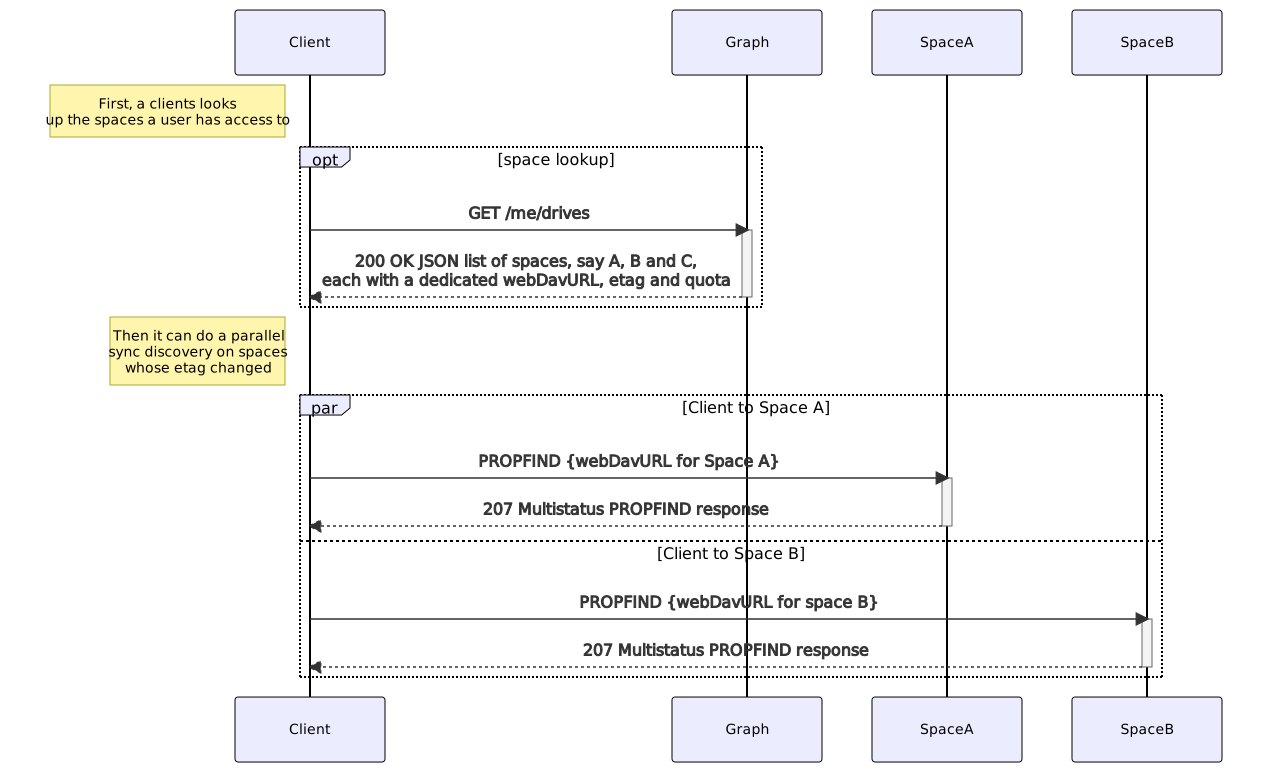
The following image gives an overview of the scenario when a client requests to list available spaces the user has access to. To do so, the client is directed with his request automatically via the proxy service to the graph service.
Users and Groups API
The graph service provides endpoints for querying users and groups. It features two different backend implementations:
-
ldap:
This is currently the default backend. It queries user and group information from an LDAP server. Depending on the configuration, it can also be used to manage (create, update, delete) users and groups provided by an LDAP server. -
cs3:
This backend queries users and groups using the CS3 identity APIs as implemented by theusersandgroupsservice. This backend is currently still experimental and only implements a subset of the Libre Graph API. It should not be used in production.
LDAP Configuration
The LDAP backend is configured using a set of environment variables. A detailed list of all the available configuration options can be found in the configuration section below. The LDAP related options are prefixed with OCIS_LDAP_ (or GRAPH_LDAP_ for settings specific to the graph service).
Read-Only Access to Existing LDAP Servers
To connect the graph service to an existing LDAP server, set OCIS_LDAP_SERVER_WRITE_ENABLED to false to prevent the graph service from sending write operations to the LDAP server. Also set the various OCIS_LDAP_* environment variables to match the configuration of the LDAP server you are connecting to. An example configuration for connecting Infinite Scale to an instance of Microsoft Active Directory is available here.
Using a Write Enabled LDAP Server
To use the graph service for managing (create, update, delete) users and groups, a write enabled LDAP server is required. In the default configuration, the graph service will use the simple LDAP server that is bundled with infinite Scale in the idm service which provides all the required features. It is also possible to setup up an external LDAP server with write access for use with Infinite Scale. It is recommended to use OpenLDAP for this. The LDAP server needs to fulfill a couple of requirements with respect to the available schema:
-
The LDAP server must provide the
inetOrgPersonobject class for users and thegroupOfNamesobject class for groups. -
The graph service maintains a few additional attributes for users and groups that are not available in the standard LDAP schema. A schema file (ldif), ready to use with OpenLDAP defining those additional attributes, is available: here.
Query Filters Provided by the Graph API
Some API endpoints provided by the graph service allow query filters to be specified. The filter syntax is based on the OData Specification. See the Libre Graph API for examples on the filters supported when querying users.
Keycloak Configuration for the Personal Data Export
If Keycloak is used for authentication, GDPR regulations require to add all personal identifiable information that Keycloak has about the user to the personal data export. To do this, the following environment variables must be set:
| Environment Variable | Description |
|---|---|
|
The URL to the Keycloak instance. |
|
The client ID of the client that is used to authenticate with Keycloak. This client has to be able to list users and get the credential data. |
|
The client secret of the client that is used to authenticate with Keycloak. |
|
The realm the client is defined in. |
|
The realm Infinite Scale users are defined in. |
|
If set to true, the TLS certificate of the Keycloak instance is not verified. |
Keycloak Client Configuration
The client that is used to authenticate with Keycloak has to be able to list users and get the credential data. To do this, the following roles have to be assigned to the client and they have to be about the realm that contains the Infinite Scale users:
-
view-users -
view-identity-providers -
view-realm -
view-clients -
view-events -
view-authorization
Note that these roles are only available to assign if the client is in the master realm.
Translations
The graph service has embedded translations sourced via transifex to provide a basic set of translated languages. These embedded translations are available for all deployment scenarios. In addition, the service supports custom translations, though it is currently not possible to just add custom translations to embedded ones. If custom translations are configured, the embedded ones are not used. To configure custom translations, the GRAPH_TRANSLATION_PATH environment variable needs to point to a base folder that will contain the translation files. This path must be available from all instances of the userlog service, a shared storage is recommended. Translation files must be of type .po or .mo. For each language, the filename needs to be graph.po (or graph.mo) and stored in a folder structure defining the language code. In general the path/name pattern for a translation file needs to be:
{GRAPH_TRANSLATION_PATH}/{language-code}/LC_MESSAGES/graph.poThe language code pattern is composed of language[_territory] where language is the base language and _territory is optional and defines a country.
For example, for the language de, one needs to place the corresponding translation files to
{GRAPH_TRANSLATION_PATH}/de/LC_MESSAGES/graph.po
For the time being, the embedded ownCloud Web frontend only supports the main language code but does not handle any territory. When strings are available in the language code language_territory, the web frontend does not see it as it only requests language. In consequence, any translations made must exist in the requested language to avoid a fallback to the default.
|
Translation Rules
-
If a requested language code is not available, the service tries to fall back to the base language if available. For example, if the requested language-code
de_DEis not available, the service tries to fall back to translations in thedefolder. -
If the base language
deis also not available, the service falls back to the system’s default English (en), which is the source of the texts provided by the code.
Default Language
The default language can be defined via the OCIS_DEFAULT_LANGUAGE environment variable. See the settings service for a detailed description.
Caching
The graph service can use a configured store via the global OCIS_CACHE_STORE environment variable.
Note that for each global environment variable, an independent service-based one might be available additionally. For precedences see Environment Variable Notes. Check the configuration section below. Supported stores are:
| Store Type | Description |
|---|---|
|
Basic in-memory store. Will not survive a restart. |
|
Stores data using key-value-store feature of NATS JetStream. |
|
Stores data in a configured Redis Sentinel cluster. |
|
Stores nothing. Useful for testing. Not recommended in production environments. |
The graph service can only be scaled if not using the memory store and the stores are configured identically over all instances!
|
| If you have used one of the deprecated stores of a former version, you should reconfigure to use one of the supported ones as the deprecated stores will be removed in a later version. |
- Store specific notes
-
-
When using
redis-sentinel:
The Redis master to use is configured via e.g.OCIS_CACHE_STORE_NODESin the form of<sentinel-host>:<sentinel-port>/<redis-master>like10.10.0.200:26379/mymaster. -
When using
nats-js-kv:-
It is recommended to set
OCIS_CACHE_STORE_NODESto the same value asOCIS_EVENTS_ENDPOINT. That way the cache uses the same nats instance as the event bus. See the Event Bus Configuration for more details. -
Authentication can be added, if configured, via
OCIS_CACHE_AUTH_USERNAMEandOCIS_CACHE_AUTH_PASSWORD. -
It is possible to set
OCIS_CACHE_DISABLE_PERSISTENCEto instruct nats to not persist cache data on disc.
-
-
Event Bus Configuration
The Infinite Scale event bus can be configured by a set of environment variables.
|
Note that for each global environment variable, a service-based one might be available additionally. For precedences see Environment Variable Notes. Check the configuration section below.
Without the aim of completeness, see the list of environment variables to configure the event bus:
| Envvar | Description |
|---|---|
|
The address of the event system. |
|
The clusterID of the event system. Mandatory when using NATS as event system. |
|
Enable TLS for the connection to the events broker. |
|
Whether to verify the server TLS certificates. |
|
The username to authenticate with the events broker. |
|
The password to authenticate with the events broker. |
Configuration
Environment Variables
The graph service is configured via the following environment variables. Read the Environment Variable Types documentation for important details. Column IV shows with which release the environment variable has been introduced.
| Name | IV | Type | Default Value | Description |
|---|---|---|---|---|
|
pre5.0 |
bool |
false |
Activates tracing. |
|
pre5.0 |
string |
|
The type of tracing. Defaults to '', which is the same as 'jaeger'. Allowed tracing types are 'jaeger', 'otlp' and '' as of now. |
|
pre5.0 |
string |
|
The endpoint of the tracing agent. |
|
pre5.0 |
string |
|
The HTTP endpoint for sending spans directly to a collector, i.e. http://jaeger-collector:14268/api/traces. Only used if the tracing endpoint is unset. |
|
pre5.0 |
string |
|
The log level. Valid values are: 'panic', 'fatal', 'error', 'warn', 'info', 'debug', 'trace'. |
|
pre5.0 |
bool |
false |
Activates pretty log output. |
|
pre5.0 |
bool |
false |
Activates colorized log output. |
|
pre5.0 |
string |
|
The path to the log file. Activates logging to this file if set. |
|
pre5.0 |
string |
memory |
The type of the cache store. Supported values are: 'memory', 'redis-sentinel', 'nats-js-kv', 'noop'. See the text description for details. |
|
pre5.0 |
[]string |
[127.0.0.1:9233] |
A list of nodes to access the configured store. This has no effect when 'memory' store are configured. Note that the behaviour how nodes are used is dependent on the library of the configured store. See the Environment Variable Types description for more details. |
|
pre5.0 |
string |
cache-roles |
The database name the configured store should use. |
|
pre5.0 |
string |
|
The database table the store should use. |
|
pre5.0 |
Duration |
336h0m0s |
Time to live for cache records in the graph. Defaults to '336h' (2 weeks). See the Environment Variable Types description for more details. |
|
5.0 |
bool |
false |
Disables persistence of the cache. Only applies when store type 'nats-js-kv' is configured. Defaults to false. |
|
5.0 |
string |
|
The username to authenticate with the cache. Only applies when store type 'nats-js-kv' is configured. |
|
5.0 |
string |
|
The password to authenticate with the cache. Only applies when store type 'nats-js-kv' is configured. |
|
8.3.0 |
bool |
false |
Activate TLS for the connection to the cache store. Only applies when store type 'nats-js-kv' is configured. |
|
8.3.0 |
bool |
false |
Disable TLS certificate verification for the cache store connection. Only applies when store type 'nats-js-kv' is configured. |
|
8.3.0 |
string |
|
Path to the PEM-encoded root CA certificate for the cache store TLS connection. Only applies when store type 'nats-js-kv' is configured. |
|
pre5.0 |
string |
127.0.0.1:9124 |
Bind address of the debug server, where metrics, health, config and debug endpoints will be exposed. |
|
pre5.0 |
string |
|
Token to secure the metrics endpoint. |
|
pre5.0 |
bool |
false |
Enables pprof, which can be used for profiling. |
|
pre5.0 |
bool |
false |
Enables zpages, which can be used for collecting and viewing in-memory traces. |
|
pre5.0 |
string |
127.0.0.1:9120 |
The bind address of the HTTP service. |
|
pre5.0 |
string |
/graph |
Subdirectory that serves as the root for this HTTP service. |
|
pre5.0 |
bool |
false |
Activates TLS for the http based services using the server certifcate and key configured via OCIS_HTTP_TLS_CERTIFICATE and OCIS_HTTP_TLS_KEY. If OCIS_HTTP_TLS_CERTIFICATE is not set a temporary server certificate is generated - to be used with PROXY_INSECURE_BACKEND=true. |
|
pre5.0 |
string |
|
Path/File name of the TLS server certificate (in PEM format) for the http services. |
|
pre5.0 |
string |
|
Path/File name for the TLS certificate key (in PEM format) for the server certificate to use for the http services. |
|
pre5.0 |
string |
|
An optional API bearer token |
|
pre5.0 |
[]string |
[*] |
A list of allowed CORS origins. See following chapter for more details: Access-Control-Allow-Origin at https://developer.mozilla.org/en-US/docs/Web/HTTP/Headers/Access-Control-Allow-Origin. See the Environment Variable Types description for more details. |
|
pre5.0 |
[]string |
[GET POST PUT PATCH DELETE OPTIONS] |
A list of allowed CORS methods. See following chapter for more details: Access-Control-Request-Method at https://developer.mozilla.org/en-US/docs/Web/HTTP/Headers/Access-Control-Request-Method. See the Environment Variable Types description for more details. |
|
pre5.0 |
[]string |
[Authorization Origin Content-Type Accept X-Requested-With X-Request-Id Purge Restore] |
A list of allowed CORS headers. See following chapter for more details: Access-Control-Request-Headers at https://developer.mozilla.org/en-US/docs/Web/HTTP/Headers/Access-Control-Request-Headers. See the Environment Variable Types description for more details. |
|
pre5.0 |
bool |
true |
Allow credentials for CORS.See following chapter for more details: Access-Control-Allow-Credentials at https://developer.mozilla.org/en-US/docs/Web/HTTP/Headers/Access-Control-Allow-Credentials. |
|
pre5.0 |
int |
20 |
The amount of group members allowed to be added with a single patch request. |
|
pre5.0 |
string |
default |
Apply restrictions to usernames. Supported values are 'default' and 'none'. When set to 'default', user names must not start with a number and are restricted to ASCII characters. When set to 'none', no restrictions are applied. The default value is 'default'. |
|
pre5.0 |
bool |
true |
Whether to assign newly created users the default role 'User'. Set this to 'false' if you want to assign roles manually, or if the role assignment should happen at first login. Set this to 'true' (the default) to assign the role 'User' when creating a new user. |
|
5.0 |
int |
3 |
The minimum length the search term needs to have for unprivileged users when searching for users or groups. |
|
7.3.0 |
[]string |
[] |
The attributes to display in the user search results. |
|
pre5.0 |
string |
com.owncloud.api.gateway |
The CS3 gateway endpoint. |
|
pre5.0 |
string |
|
TLS mode for grpc connection to the go-micro based grpc services. Possible values are 'off', 'insecure' and 'on'. 'off': disables transport security for the clients. 'insecure' allows using transport security, but disables certificate verification (to be used with the autogenerated self-signed certificates). 'on' enables transport security, including server certificate verification. |
|
pre5.0 |
string |
|
Path/File name for the root CA certificate (in PEM format) used to validate TLS server certificates of the go-micro based grpc services. |
|
pre5.0 |
string |
|
The secret to mint and validate jwt tokens. |
|
pre5.0 |
string |
|
The ocis application ID shown in the graph. All app roles are tied to this ID. |
|
pre5.0 |
string |
ownCloud Infinite Scale |
The ocis application name. |
|
pre5.0 |
string |
https://localhost:9200 |
The public facing URL of WebDAV. |
|
pre5.0 |
string |
/dav/spaces/ |
The WebDAV sub-path for spaces. |
|
pre5.0 |
string |
1000000000 |
The default quota in bytes. |
|
pre5.0 |
int |
60000000000 |
Max TTL in seconds for the spaces property cache. |
|
pre5.0 |
int |
60000000000 |
Max TTL in seconds for the spaces users cache. |
|
pre5.0 |
int |
60000000000 |
Max TTL in seconds for the spaces groups cache. |
|
5.0 |
string |
com.owncloud.api.storage-users |
The address of the storage-users service. |
|
8.1.0 |
string |
com.owncloud.api.storage-users-vault |
The address of the storage-users-vault service, a special configured storage-users service. Applicable only when 'GRAPH_ENABLE_VAULT_MODE' is enabled. |
|
5.0 |
string |
|
The default language used by services and the WebUI. If not defined, English will be used as default. See the documentation for more details. |
|
7.0.0 |
string |
|
(optional) Set this to a path with custom translations to overwrite the builtin translations. Note that file and folder naming rules apply, see the documentation for more details. |
|
pre5.0 |
string |
ldap |
The user identity backend to use. Supported backend types are 'ldap' and 'cs3'. |
|
pre5.0 |
string |
ldaps://localhost:9235 |
URI of the LDAP Server to connect to. Supported URI schemes are 'ldaps://' and 'ldap://' |
|
pre5.0 |
string |
/var/lib/ocis/idm/ldap.crt |
Path/File name for the root CA certificate (in PEM format) used to validate TLS server certificates of the LDAP service. If not defined, the root directory derives from $OCIS_BASE_DATA_PATH/idm. |
|
pre5.0 |
bool |
false |
Disable TLS certificate validation for the LDAP connections. Do not set this in production environments. |
|
pre5.0 |
string |
uid=libregraph,ou=sysusers,o=libregraph-idm |
LDAP DN to use for simple bind authentication with the target LDAP server. |
|
pre5.0 |
string |
|
Password to use for authenticating the 'bind_dn'. |
|
pre5.0 |
bool |
false |
If set to true, rely on the LDAP Server to generate a unique ID for users and groups, like when using 'entryUUID' as the user ID attribute. |
|
pre5.0 |
bool |
true |
Use the 'Password Modify Extended Operation' for updating user passwords. |
|
pre5.0 |
bool |
true |
Allow creating, modifying and deleting LDAP users via the GRAPH API. This can only be set to 'true' when keeping default settings for the LDAP user and group attribute types (the 'OCIS_LDAP_USER_SCHEMA_* and 'OCIS_LDAP_GROUP_SCHEMA_* variables). |
|
8.2.0 |
bool |
true |
Update the 'oCLastSignInTimestamp' LDAP attribute of a user when the user signs in. The attribute is only persisted when 'OCIS_LDAP_SERVER_WRITE_ENABLED' is also enabled. Set this to 'false' to avoid an LDAP write on every sign-in, e.g. when the last sign-in timestamp is not needed or the LDAP write load should be reduced. |
|
8.2.0 |
int |
1 |
Maximum number of retries for failed LDAP operations. Reads retry on transient and network errors; writes retry only when the connection failed before the request was sent (e.g. a reused idle connection found closed), so the request provably never reached the server and cannot be double-applied. Default 1. |
|
8.2.0 |
Duration |
0s |
Base delay for exponential backoff between LDAP retries (e.g. '100ms'). Set to 0 to disable backoff. |
|
8.2.0 |
Duration |
0s |
Maximum delay cap for exponential backoff between LDAP retries (e.g. '5s'). 0 (default) uses the library default cap of 60s. |
|
pre5.0 |
bool |
false |
Signals that the server has the refint plugin enabled, which makes some actions not needed. |
|
8.2.0 |
bool |
false |
Instead of a single long-lived reconnecting connection, enable a bounded pool of LDAP connections. This means that concurrent requests will no longer be serialised on one connection. |
|
8.2.0 |
int |
5 |
Maximum number of concurrently open LDAP connections when 'OCIS_LDAP_POOL_ENABLED' is 'true'. Defaults to 5 when unset or ⇐ 0. |
|
8.2.0 |
Duration |
30s |
Maximum time to wait for a pooled LDAP connection to become available once the pool is exhausted. Defaults to 30s when unset or ⇐ 0. See the Environment Variable Types description for more details. |
|
pre5.0 |
string |
ou=users,o=libregraph-idm |
Search base DN for looking up LDAP users. |
|
pre5.0 |
string |
sub |
LDAP search scope to use when looking up users. Supported scopes are 'base', 'one' and 'sub'. |
|
pre5.0 |
string |
|
LDAP filter to add to the default filters for user search like '(objectclass=ownCloud)'. |
|
pre5.0 |
string |
inetOrgPerson |
The object class to use for users in the default user search filter ('inetOrgPerson'). |
|
pre5.0 |
string |
LDAP Attribute to use for the email address of users. |
|
|
pre5.0 |
string |
displayName |
LDAP Attribute to use for the display name of users. |
|
pre5.0 |
string |
uid |
LDAP Attribute to use for username of users. |
|
pre5.0 |
string |
owncloudUUID |
LDAP Attribute to use as the unique ID for users. This should be a stable globally unique ID like a UUID. |
|
pre5.0 |
bool |
false |
Set this to true if the defined 'ID' attribute for users is of the 'OCTETSTRING' syntax. This is required when using the 'objectGUID' attribute of Active Directory for the user ID’s. |
|
pre5.0 |
string |
ownCloudUserType |
LDAP Attribute to distinguish between 'Member' and 'Guest' users. Default is 'ownCloudUserType'. |
|
pre5.0 |
string |
ownCloudUserEnabled |
LDAP Attribute to use as a flag telling if the user is enabled or disabled. |
|
8.0.0 |
string |
owncloudExternalID |
LDAP attribute that references the external ID of users during the provisioning process. The final ID is provided by an external identity provider. If it is not set, a default attribute will be used instead. |
|
pre5.0 |
string |
attribute |
An option to control the behavior for disabling users. Supported options are 'none', 'attribute' and 'group'. If set to 'group', disabling a user via API will add the user to the configured group for disabled users, if set to 'attribute' this will be done in the ldap user entry, if set to 'none' the disable request is not processed. Default is 'attribute'. |
|
pre5.0 |
string |
cn=DisabledUsersGroup,ou=groups,o=libregraph-idm |
The distinguished name of the group to which added users will be classified as disabled when 'disable_user_mechanism' is set to 'group'. |
|
pre5.0 |
string |
ou=groups,o=libregraph-idm |
Search base DN for looking up LDAP groups. |
|
pre5.0 |
string |
ou=groups,o=libregraph-idm |
Parent DN under which new groups are created. This DN needs to be subordinate to the 'GRAPH_LDAP_GROUP_BASE_DN'. This setting is only relevant when 'GRAPH_LDAP_SERVER_WRITE_ENABLED' is 'true'. It defaults to the value of 'GRAPH_LDAP_GROUP_BASE_DN'. All groups outside of this subtree are treated as readonly groups and cannot be updated. |
|
pre5.0 |
string |
sub |
LDAP search scope to use when looking up groups. Supported scopes are 'base', 'one' and 'sub'. |
|
pre5.0 |
string |
|
LDAP filter to add to the default filters for group searches. |
|
pre5.0 |
string |
groupOfNames |
The object class to use for groups in the default group search filter ('groupOfNames'). |
|
8.1.0 |
[]string |
[] |
Additional object classes to set when creating new groups (e.g. 'posixGroup'). The value of 'GRAPH_LDAP_GROUP_OBJECTCLASS' is always included. |
|
pre5.0 |
string |
cn |
LDAP Attribute to use for the name of groups. |
|
pre5.0 |
string |
member |
LDAP Attribute that is used for group members. |
|
pre5.0 |
string |
owncloudUUID |
LDAP Attribute to use as the unique id for groups. This should be a stable globally unique ID like a UUID. |
|
pre5.0 |
bool |
false |
Set this to true if the defined 'ID' attribute for groups is of the 'OCTETSTRING' syntax. This is required when using the 'objectGUID' attribute of Active Directory for the group ID’s. |
|
pre5.0 |
bool |
false |
Enable LDAP support for managing education related resources. |
|
pre5.0 |
string |
|
Search base DN for looking up LDAP schools. |
|
pre5.0 |
string |
|
LDAP search scope to use when looking up schools. Supported scopes are 'base', 'one' and 'sub'. |
|
pre5.0 |
string |
|
LDAP filter to add to the default filters for school searches. |
|
pre5.0 |
string |
|
The object class to use for schools in the default school search filter. |
|
pre5.0 |
string |
|
LDAP Attribute to use for the name of a school. |
|
pre5.0 |
string |
|
LDAP Attribute to use for the number of a school. |
|
pre5.0 |
string |
|
LDAP Attribute to use as the unique id for schools. This should be a stable globally unique ID like a UUID. |
|
pre5.0 |
int |
0 |
When setting a 'terminationDate' for a school, require the date to be at least this number of days in the future. |
|
8.0.0 |
bool |
false |
If enabled, the 'OCIS_LDAP_USER_SCHEMA_EXTERNAL_ID' is used as primary identifier for the provisioning API. |
|
8.0.0 |
string |
|
LDAP Attribute to signal the user is member of an instance. Requires OCIS_MULTI_INSTANCE_ENABLED. |
|
8.0.0 |
string |
|
LDAP Attribute to signal the user is guest of an instance. Requires OCIS_MULTI_INSTANCE_ENABLED. |
|
8.0.0 |
string |
|
LDAP Attribute to signal which instance the group is belonging to. Requires OCIS_MULTI_INSTANCE_ENABLED. |
|
8.0.0 |
string |
|
LDAP Attribute to be used for searching users on other instances. Requires OCIS_MULTI_INSTANCE_ENABLED. |
|
8.0.0 |
bool |
false |
The InstanceMapper allows mapping instance names (user readable) to instance IDs (machine readable) based on an LDAP query. See other INSTANCE_MAPPER env vars. Requires OCIS_MULTI_INSTANCE_ENABLED. |
|
8.0.0 |
string |
|
BaseDN of the 'instancename to instanceid' mapper in LDAP. Requires OCIS_MULTI_INSTANCE_ENABLED. |
|
8.0.0 |
string |
|
LDAP Attribute of the instance name. Requires OCIS_MULTI_INSTANCE_ENABLED. |
|
8.0.0 |
string |
|
LDAP Attribute of the instance ID. Requires OCIS_MULTI_INSTANCE_ENABLED. |
|
8.0.0 |
string |
|
Template for the users unique reference across oCIS instances. Requires OCIS_MULTI_INSTANCE_ENABLED. |
|
8.0.0 |
string |
|
Template for the instance URL. Requires OCIS_MULTI_INSTANCE_ENABLED. |
|
5.0 |
bool |
false |
Include OCM sharees when listing users. |
|
pre5.0 |
string |
127.0.0.1:9233 |
The address of the event system. The event system is the message queuing service. It is used as message broker for the microservice architecture. Set to a empty string to disable emitting events. |
|
pre5.0 |
string |
ocis-cluster |
The clusterID of the event system. The event system is the message queuing service. It is used as message broker for the microservice architecture. |
|
pre5.0 |
bool |
false |
Whether to verify the server TLS certificates. |
|
pre5.0 |
string |
|
The root CA certificate used to validate the server’s TLS certificate. If provided GRAPH_EVENTS_TLS_INSECURE will be seen as false. |
|
pre5.0 |
bool |
false |
Enable TLS for the connection to the events broker. The events broker is the ocis service which receives and delivers events between the services. |
|
5.0 |
string |
|
The username to authenticate with the events broker. The events broker is the ocis service which receives and delivers events between the services. |
|
5.0 |
string |
|
The password to authenticate with the events broker. The events broker is the ocis service which receives and delivers events between the services. |
|
7.0.0 |
[]string |
[b1e2218d-eef8-4d4c-b82d-0f1a1b48f3b5 a8d5fe5e-96e3-418d-825b-534dbdf22b99 fb6c3e19-e378-47e5-b277-9732f9de6e21 58c63c02-1d89-4572-916a-870abc5a1b7d 2d00ce52-1fc2-4dbc-8b95-a73b73395f5a 1c996275-f1c9-4e71-abdf-a42f6495e960 312c0871-5ef7-4b3a-85b6-0e4074c64049] |
A comma separated list of roles that are available for assignment. |
|
7.0.0 |
int |
20 |
The maximum number of concurrent requests the service will handle. |
|
8.2.0 |
Duration |
10s |
The maximum duration to wait for the storage to respond while resolving a single received share’s resource when listing 'sharedWithMe'. Bounding each resource lookup individually prevents one slow or unreachable resource from consuming the request deadline shared by all the other shares. A share whose resource cannot be statted within this time is still listed as a degraded item instead of being dropped. Defaults to '10s'. See the Environment Variable Types description for more details. |
|
pre5.0 |
string |
|
The URL to access keycloak. |
|
pre5.0 |
string |
|
The client id to authenticate with keycloak. |
|
pre5.0 |
string |
|
The client secret to use in authentication. |
|
pre5.0 |
string |
|
The realm the client is defined in. |
|
pre5.0 |
string |
|
The realm users are defined. |
|
pre5.0 |
bool |
false |
Disable TLS certificate validation for Keycloak connections. Do not set this in production environments. |
|
5.0 |
string |
|
The ID of the service account the service should use. See the 'auth-service' service description for more details. |
|
5.0 |
string |
|
The service account secret. |
|
8.0.0 |
bool |
false |
Enable multiple instances of Infinite Scale. |
|
8.0.0 |
string |
|
The unique ID of this instance. |
|
8.1.0 |
string |
|
The master ID that grants access to all instances. Users with this ID in their memberOf or guestOf claims can access any instance. Leave empty to disable. |
|
8.0.0 |
string |
|
The regular expression extracting username and instancename from a user provided search. |
|
7.2.0 |
int |
100 |
Define the maximum tag length. Defaults to 100 if not set. Set to 0 to not limit the tag length. Changes only impact the validation of new tags. |
|
8.1.0 |
bool |
false |
Enable vault mode in addition to the regular graph service. This only applies when the additional storage-users-vault service is running, which is a special configured storage-users service. |
|
8.2.0 |
bool |
true |
Enables direct sharing with users and groups. When disabled, creating new user, group or federated shares via the drive item invite endpoints is rejected. Public link sharing and space membership are not affected. |
YAML Example
-
Note the file shown below must be renamed and placed in the correct folder according to the Configuration File Naming conventions to be effective.
-
See the Notes for Environment Variables if you want to use environment variables in the yaml file.
# Autogenerated
# Filename: graph-config-example.yaml

tracing:
  enabled: false
  type: ""
  endpoint: ""
  collector: ""
log:
  level: ""
  pretty: false
  color: false
  file: ""
cache:
  store: memory
  nodes:
  - 127.0.0.1:9233
  database: cache-roles
  table: ""
  ttl: 336h0m0s
  disable_persistence: false
  username: ""
  password: ""
  enable_tls: false
  tls_insecure: false
  tls_root_ca_certificate: ""
debug:
  addr: 127.0.0.1:9124
  token: ""
  pprof: false
  zpages: false
http:
  addr: 127.0.0.1:9120
  root: /graph
  tls:
    enabled: false
    cert: ""
    key: ""
  apitoken: ""
  cors:
    allow_origins:
    - '*'
    allow_methods:
    - GET
    - POST
    - PUT
    - PATCH
    - DELETE
    - OPTIONS
    allow_headers:
    - Authorization
    - Origin
    - Content-Type
    - Accept
    - X-Requested-With
    - X-Request-Id
    - Purge
    - Restore
    allow_credentials: true
api:
  group_members_patch_limit: 20
  graph_username_match: default
  graph_assign_default_user_role: true
  graph_identity_search_min_length: 3
  user_search_displayed_attributes: []
reva:
  address: com.owncloud.api.gateway
  tls:
    mode: ""
    cacert: ""
token_manager:
  jwt_secret: ""
grpc_client_tls: null
application:
  id: ""
  displayname: ownCloud Infinite Scale
spaces:
  webdav_base: https://localhost:9200
  webdav_path: /dav/spaces/
  default_quota: "1000000000"
  extended_space_properties_cache_ttl: 60000000000
  users_cache_ttl: 60000000000
  groups_cache_ttl: 60000000000
  storage_users_address: com.owncloud.api.storage-users
  storage_users_vault_address: com.owncloud.api.storage-users-vault
  default_language: ""
  translation_path: ""
identity:
  backend: ldap
  ldap:
    uri: ldaps://localhost:9235
    cacert: /var/lib/ocis/idm/ldap.crt
    insecure: false
    bind_dn: uid=libregraph,ou=sysusers,o=libregraph-idm
    bind_password: ""
    use_server_uuid: false
    use_password_modify_exop: true
    write_enabled: true
    update_user_last_sign_in_date: true
    retry_max_count: 1
    retry_base_delay: 0s
    retry_max_delay: 0s
    refint_enabled: false
    pool_enabled: false
    pool_size: 5
    pool_checkout_timeout: 30s
    user_base_dn: ou=users,o=libregraph-idm
    user_search_scope: sub
    user_filter: ""
    user_objectclass: inetOrgPerson
    user_mail_attribute: mail
    user_displayname_attribute: displayName
    user_name_attribute: uid
    user_id_attribute: owncloudUUID
    user_id_is_octet_string: false
    user_type_attribute: ownCloudUserType
    user_enabled_attribute: ownCloudUserEnabled
    external_id_attribute: owncloudExternalID
    disable_user_mechanism: attribute
    ldap_disabled_users_group_dn: cn=DisabledUsersGroup,ou=groups,o=libregraph-idm
    group_base_dn: ou=groups,o=libregraph-idm
    group_create_base_dn: ou=groups,o=libregraph-idm
    group_search_scope: sub
    group_filter: ""
    group_objectclass: groupOfNames
    group_additional_objectclasses: []
    group_name_attribute: cn
    group_member_attribute: member
    group_id_attribute: owncloudUUID
    group_id_is_octet_string: false
    education_resources_enabled: false
    educationconfig:
      school_base_dn: ""
      school_search_scope: ""
      school_filter: ""
      school_objectclass: ""
      school_name_attribute: ""
      school_number_attribute: ""
      school_id_attribute: ""
      school_termination_min_grace_days: 0
    require_external_id: false
    user_member_attribute: ""
    user_guest_attribute: ""
    group_affiliation_attribute: ""
    precise_search_attribute: ""
    instance_mapper_enabled: false
    instance_mapper_base_dn: ""
    instance_mapper_name_attribute: ""
    instance_mapper_id_attribute: ""
    cross_instance_reference_template: ""
    instance_url_template: ""
include_ocm_sharees: false
events:
  endpoint: 127.0.0.1:9233
  cluster: ocis-cluster
  tls_insecure: false
  tls_root_ca_certificate: ""
  enable_tls: false
  username: ""
  password: ""
unified_roles:
  available_roles:
  - b1e2218d-eef8-4d4c-b82d-0f1a1b48f3b5
  - a8d5fe5e-96e3-418d-825b-534dbdf22b99
  - fb6c3e19-e378-47e5-b277-9732f9de6e21
  - 58c63c02-1d89-4572-916a-870abc5a1b7d
  - 2d00ce52-1fc2-4dbc-8b95-a73b73395f5a
  - 1c996275-f1c9-4e71-abdf-a42f6495e960
  - 312c0871-5ef7-4b3a-85b6-0e4074c64049
max_concurrency: 20
received_shares_stat_timeout: 10s
keycloak:
  base_path: ""
  client_id: ""
  client_secret: ""
  client_realm: ""
  user_realm: ""
  insecure_skip_verify: false
service_account:
  service_account_id: ""
  service_account_secret: ""
multi_instance:
  enabled: false
  instanceid: ""
  master_id: ""
  query_regexp: ""
validation:
  max_tag_length: 100
enable_vault_mode: false
enable_user_sharing: true