OCDAV Service Configuration
Introduction
The ocDAV service is responsible for translating ownCloud-flavored WebDAV into CS3 API calls. Note that previews (thumbnails) are provided by the WebDAV service. For more details on CS3 see the REVA and CS3 description in the Architecture and Concepts section.
Sequence Diagram
General View
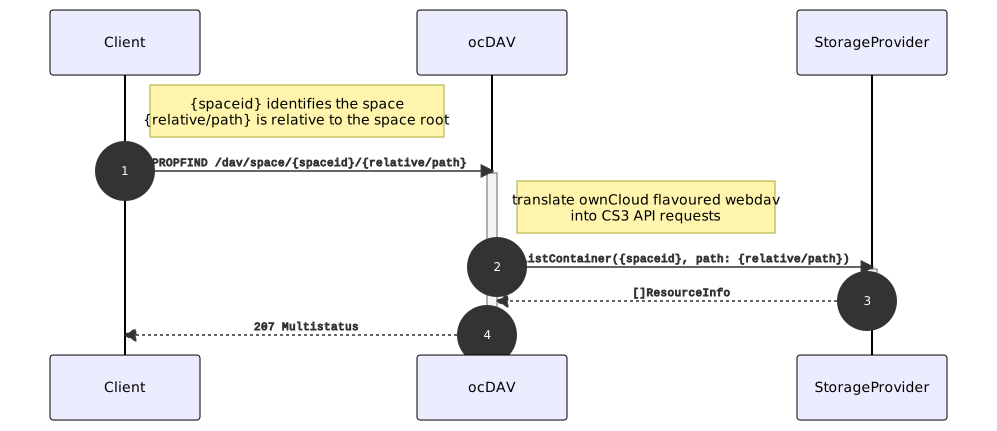
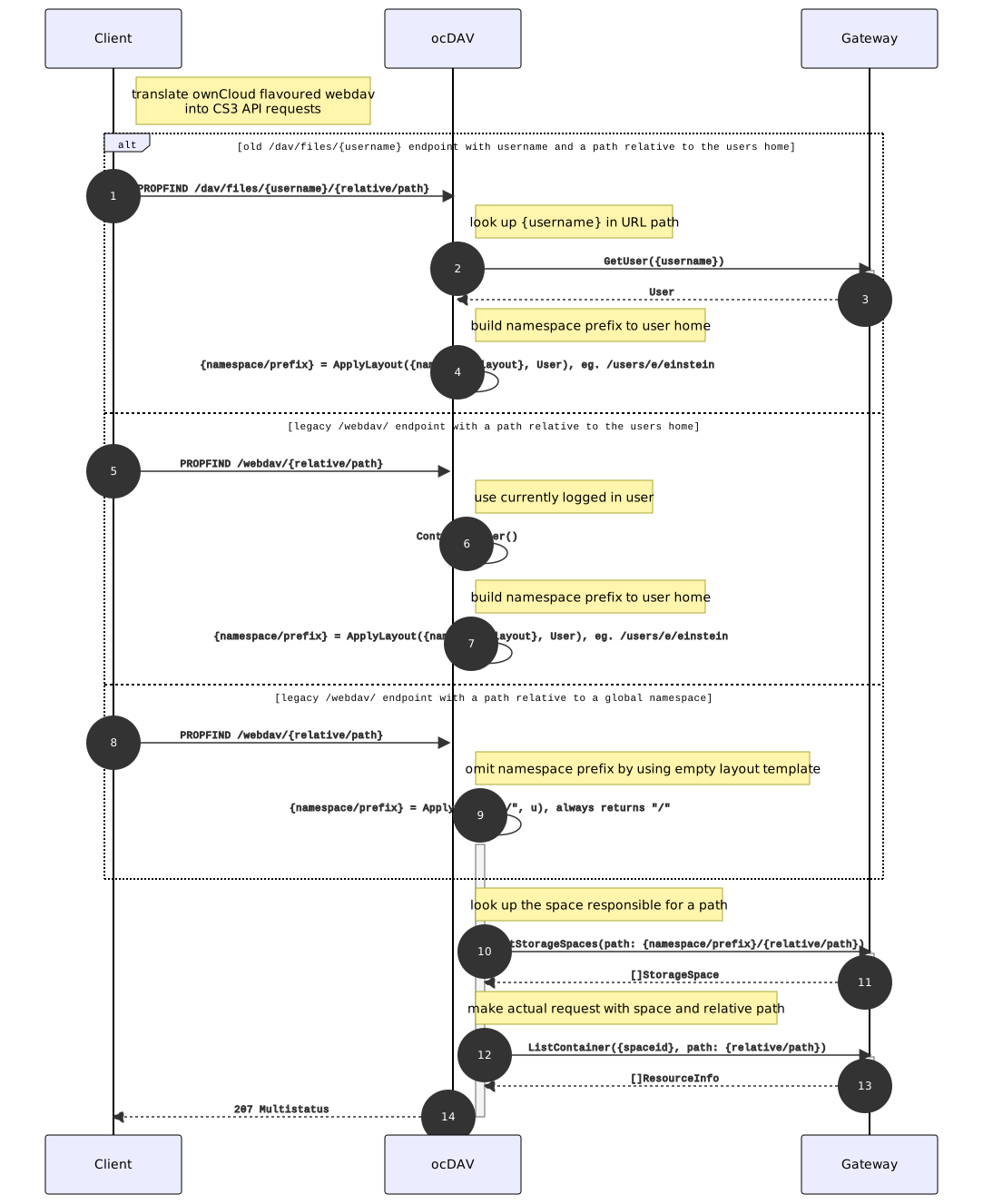
A PROPFIND finds its way to a storage provider like in the image shown below. While this is a simplification to get an understanding of what needs to go where, there are several places where sharding (splitting and distributing) can happen.
Proxy-based User Routing
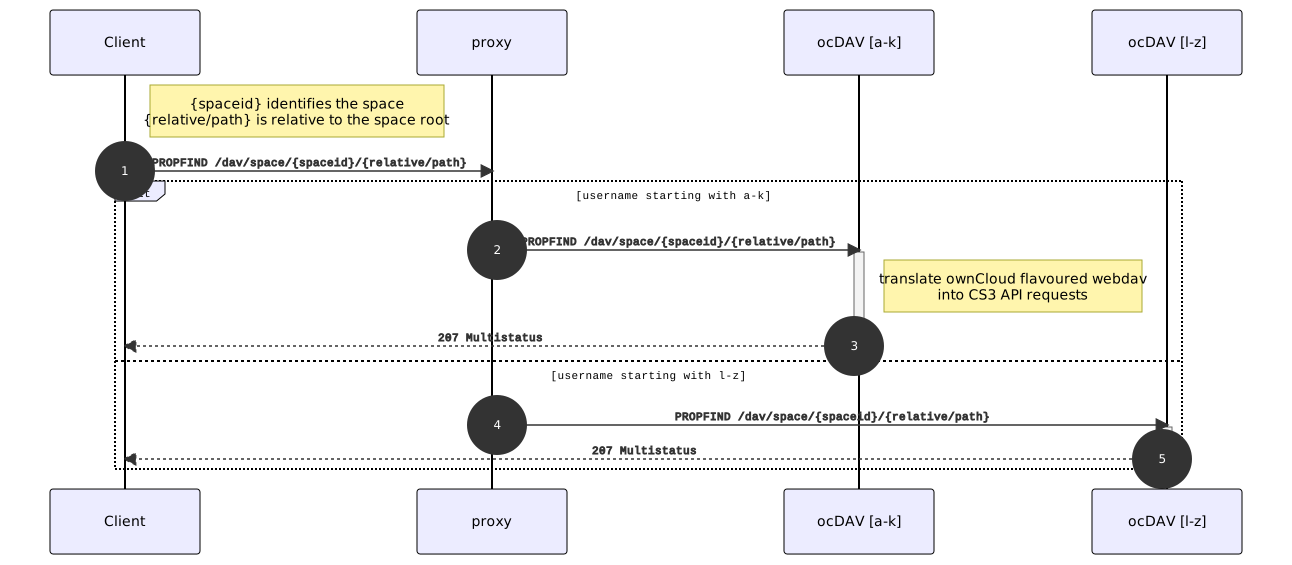
The Infinite Scale proxy authenticates requests and can forward requests to different backends, depending on the logged-in user or cookies. For example, multiple ocdav services can be configured to shard users, based on username or affiliation.
Gateway-based Path or Storage Provider ID-based Routing
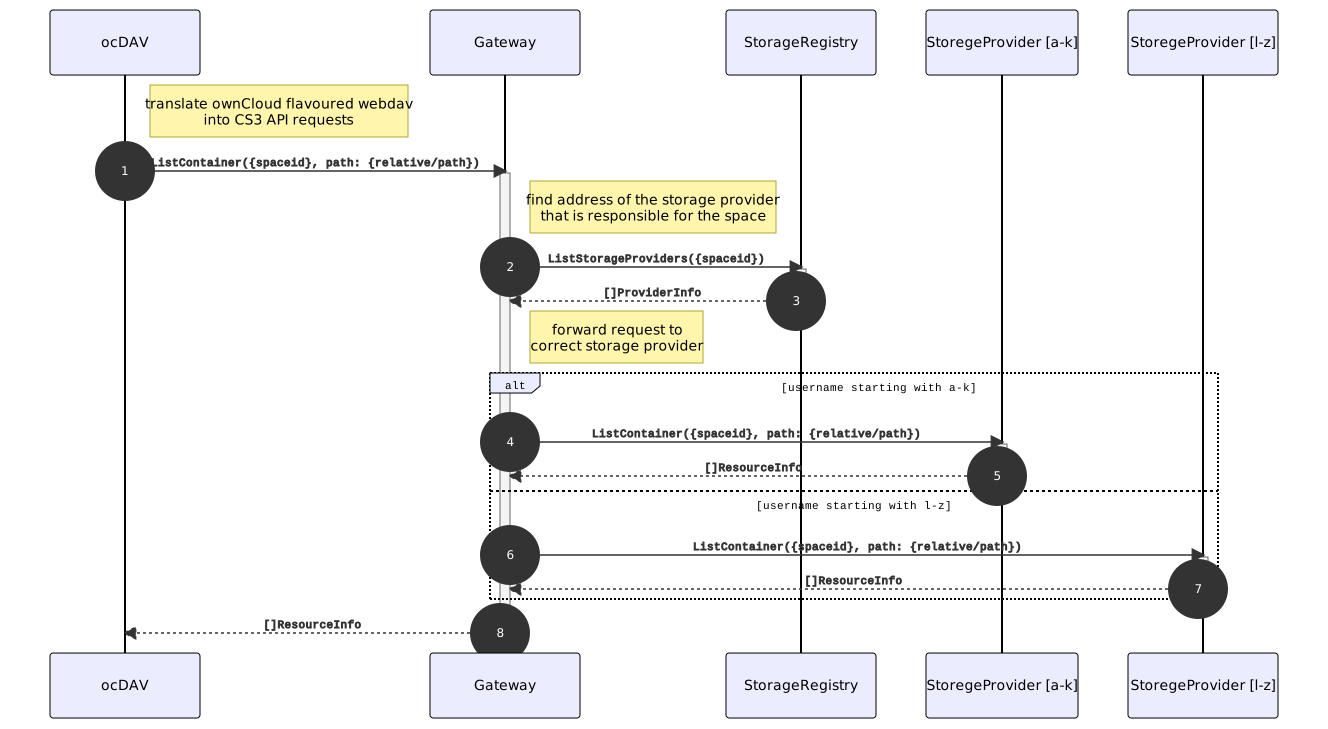
The CS3 gateway acts as a facade to multiple storage providers that can be configured with the storage registry.
PROPFIND Request Against Old Webdav Endpoints
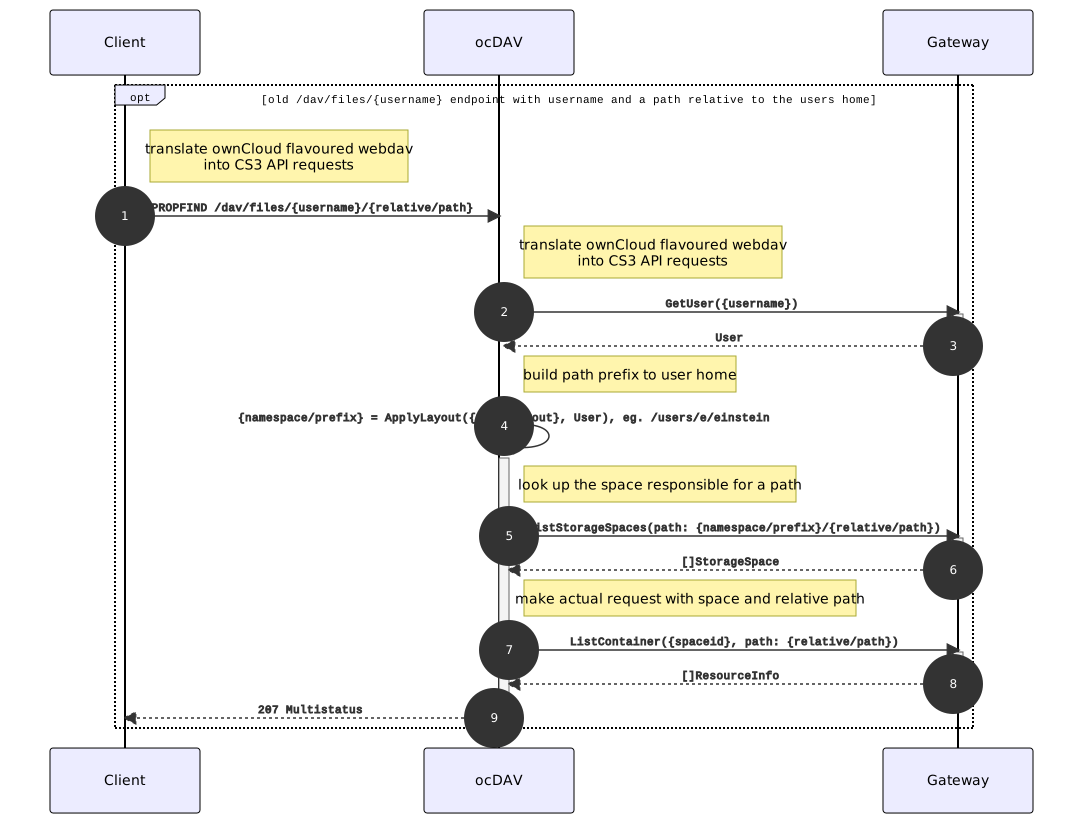
This is how the old endpoint with username and a path relative to the user’s home looks like: /dav/files/{username}
To route a PROPFIND request against the old webdav endpoints like /dav/files/username, ocdav first has to build a CS3 namespace prefix, e.g. /users/{{.Id.OpaqueId}} to the user’s home.
Handling Legacy Global Namespace Webdav Endpoints
The reason Infinite Scale uses a path-based lookup instead of looking up the current user’s home using the user ID and a space type filter is, because there are deployments that use a global namespace at the legacy /webdav endpoint. To support these use cases, the gateway allows looking up spaces using their mount path.
Configuration
Environment Variables
The ocdav service is configured via the following environment variables. Read the Environment Variable Types documentation for important details. Column IV shows with which release the environment variable has been introduced.
| Name | IV | Type | Default Value | Description |
|---|---|---|---|---|
|
pre5.0 |
bool |
false |
Activates tracing. |
|
pre5.0 |
string |
|
The type of tracing. Defaults to '', which is the same as 'jaeger'. Allowed tracing types are 'jaeger', 'otlp' and '' as of now. |
|
pre5.0 |
string |
|
The endpoint of the tracing agent. |
|
pre5.0 |
string |
|
The HTTP endpoint for sending spans directly to a collector, i.e. http://jaeger-collector:14268/api/traces. Only used if the tracing endpoint is unset. |
|
pre5.0 |
string |
|
The log level. Valid values are: 'panic', 'fatal', 'error', 'warn', 'info', 'debug', 'trace'. |
|
pre5.0 |
bool |
false |
Activates pretty log output. |
|
pre5.0 |
bool |
false |
Activates colorized log output. |
|
pre5.0 |
string |
|
The path to the log file. Activates logging to this file if set. |
|
pre5.0 |
string |
127.0.0.1:9163 |
Bind address of the debug server, where metrics, health, config and debug endpoints will be exposed. |
|
pre5.0 |
string |
|
Token to secure the metrics endpoint. |
|
pre5.0 |
bool |
false |
Enables pprof, which can be used for profiling. |
|
pre5.0 |
bool |
false |
Enables zpages, which can be used for collecting and viewing in-memory traces. |
|
pre5.0 |
string |
127.0.0.1:9350 |
The bind address of the HTTP service. |
|
pre5.0 |
string |
tcp |
The transport protocol of the HTTP service. |
|
pre5.0 |
string |
|
A URL path prefix for the handler. |
|
pre5.0 |
[]string |
[https://localhost:9200] |
A list of allowed CORS origins. See following chapter for more details: Access-Control-Allow-Origin at https://developer.mozilla.org/en-US/docs/Web/HTTP/Headers/Access-Control-Allow-Origin. See the Environment Variable Types description for more details. |
|
pre5.0 |
[]string |
[OPTIONS HEAD GET PUT POST DELETE MKCOL PROPFIND PROPPATCH MOVE COPY REPORT SEARCH] |
A list of allowed CORS methods. See following chapter for more details: Access-Control-Request-Method at https://developer.mozilla.org/en-US/docs/Web/HTTP/Headers/Access-Control-Request-Method. See the Environment Variable Types description for more details. |
|
pre5.0 |
[]string |
[Origin Accept Content-Type Depth Authorization Ocs-Apirequest If-None-Match If-Match Destination Overwrite X-Request-Id X-Requested-With Tus-Resumable Tus-Checksum-Algorithm Upload-Concat Upload-Length Upload-Metadata Upload-Defer-Length Upload-Expires Upload-Checksum Upload-Offset X-HTTP-Method-Override Cache-Control] |
A list of allowed CORS headers. See following chapter for more details: Access-Control-Request-Headers at https://developer.mozilla.org/en-US/docs/Web/HTTP/Headers/Access-Control-Request-Headers. See the Environment Variable Types description for more details. |
|
pre5.0 |
bool |
false |
Allow credentials for CORS.See following chapter for more details: Access-Control-Allow-Credentials at https://developer.mozilla.org/en-US/docs/Web/HTTP/Headers/Access-Control-Allow-Credentials. |
|
pre5.0 |
string |
|
The secret to mint and validate jwt tokens. |
|
pre5.0 |
string |
com.owncloud.api.gateway |
The CS3 gateway endpoint. |
|
pre5.0 |
string |
|
TLS mode for grpc connection to the go-micro based grpc services. Possible values are 'off', 'insecure' and 'on'. 'off': disables transport security for the clients. 'insecure' allows using transport security, but disables certificate verification (to be used with the autogenerated self-signed certificates). 'on' enables transport security, including server certificate verification. |
|
pre5.0 |
string |
|
Path/File name for the root CA certificate (in PEM format) used to validate TLS server certificates of the go-micro based grpc services. |
|
pre5.0 |
bool |
false |
Disables the loading of user’s group memberships from the reva access token. |
|
pre5.0 |
string |
/users/{{.Id.OpaqueId}} |
Jail requests to /dav/webdav into this CS3 namespace. Supports template layouting with CS3 User properties. |
|
pre5.0 |
string |
/users/{{.Id.OpaqueId}} |
Jail requests to /dav/files/{username} into this CS3 namespace. Supports template layouting with CS3 User properties. |
|
pre5.0 |
string |
/Shares |
The human readable path for the share jail. Relative to a users personal space root. Upcased intentionally. |
|
5.0 |
string |
/public |
The human readable path prefix for the ocm shares. |
|
pre5.0 |
string |
https://localhost:9200 |
URL where oCIS is reachable for users. |
|
pre5.0 |
bool |
false |
Allow insecure connections to the GATEWAY service. |
|
pre5.0 |
int64 |
84300 |
Request timeout in seconds for requests from the oCDAV service to the GATEWAY service. |
|
pre5.0 |
string |
|
Machine auth API key used to validate internal requests necessary for the access to resources from other services. |
|
pre5.0 |
string |
Community |
Edition of oCIS. Used for branding purposes. |
|
pre5.0 |
bool |
false |
Allow the use of depth infinity in PROPFINDS. When enabled, a propfind will traverse through all subfolders. If many subfolders are expected, depth infinity can cause heavy server load and/or delayed response times. |
YAML Example
-
Note the file shown below must be renamed and placed in the correct folder according to the Configuration File Naming conventions to be effective.
-
See the Notes for Environment Variables if you want to use environment variables in the yaml file.
# Autogenerated
# Filename: ocdav-config-example.yaml

tracing:
  enabled: false
  type: ""
  endpoint: ""
  collector: ""
log:
  level: ""
  pretty: false
  color: false
  file: ""
debug:
  addr: 127.0.0.1:9163
  token: ""
  pprof: false
  zpages: false
http:
  addr: 127.0.0.1:9350
  protocol: tcp
  prefix: ""
  cors:
    allow_origins:
    - https://localhost:9200
    allow_methods:
    - OPTIONS
    - HEAD
    - GET
    - PUT
    - POST
    - DELETE
    - MKCOL
    - PROPFIND
    - PROPPATCH
    - MOVE
    - COPY
    - REPORT
    - SEARCH
    allow_headers:
    - Origin
    - Accept
    - Content-Type
    - Depth
    - Authorization
    - Ocs-Apirequest
    - If-None-Match
    - If-Match
    - Destination
    - Overwrite
    - X-Request-Id
    - X-Requested-With
    - Tus-Resumable
    - Tus-Checksum-Algorithm
    - Upload-Concat
    - Upload-Length
    - Upload-Metadata
    - Upload-Defer-Length
    - Upload-Expires
    - Upload-Checksum
    - Upload-Offset
    - X-HTTP-Method-Override
    - Cache-Control
    allow_credentials: false
token_manager:
  jwt_secret: ""
reva:
  address: com.owncloud.api.gateway
  tls:
    mode: ""
    cacert: ""
skip_user_groups_in_token: false
webdav_namespace: /users/{{.Id.OpaqueId}}
files_namespace: /users/{{.Id.OpaqueId}}
shares_namespace: /Shares
ocm_namespace: /public
public_url: https://localhost:9200
insecure: false
gateway_request_timeout: 84300
machine_auth_api_key: ""
allow_propfind_depth_infinity: false